NTLM: Legacy Contamination
NTLM (NT LAN Manager) has been authenticating Windows systems since 1993. Like radioactive waste with a 30-year half-life, it refuses to decay. It's a challenge-response protocol that proves you know a password without sending the password itself. Simple, effective, and riddled with security issues that Microsoft has been trying to decommission for decades. Yet it persists, contaminating modern environments.
What Is NTLM?
NTLM is a challenge-response authentication protocol. Instead of sending your password over the network, the server sends you a random challenge, and you prove you know the password by encrypting that challenge with a hash derived from your password. If your response matches what the server expects, you're in.
Challenge: 8-byte random number from the server.
Response: Challenge encrypted with your NT hash (plus some other data depending on version).
The critical insight: the NT hash is functionally equivalent to your password. If an attacker has your NT hash, they don't need your password. They can authenticate as you directly (pass-the-hash) because the hash is what's used to create the response, not the plaintext password.
The NTLM Handshake (3-Way)
NTLM authentication involves three messages between the client and server. Think of it like a Vault-Tec security checkpoint: identify yourself, prove your identity, get access.
The NTLM 3-way handshake: Negotiate → Challenge → Authenticate
NTLM Authentication Flow
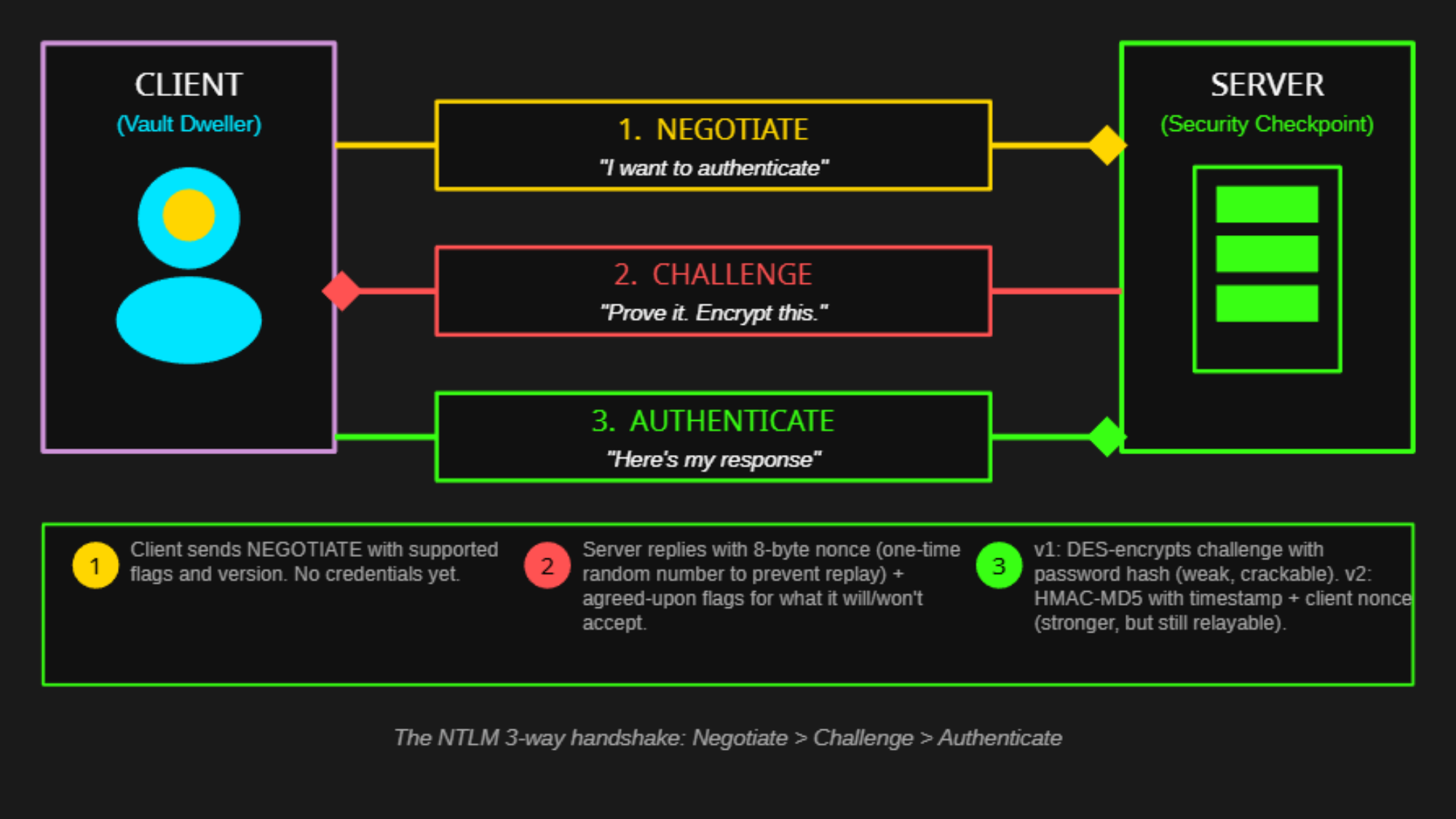
The NTLM 3-way handshake: Negotiate > Challenge > Authenticate
If the client is domain-joined and the server isn't a DC, there's actually more going on. The server doesn't have your password hash, so it forwards your response to a DC for verification. This is called pass-through authentication, and it's how NTLM relay attacks work: the attacker sits in the middle, captures your response, and forwards it somewhere else.
NTLMv1 vs NTLMv2: The Versions Matter
Not all NTLM is created equal. The version determines how the response is calculated, and NTLMv1 has cryptographic weaknesses that make it trivially crackable.
NTLMv1 DANGEROUS
Uses DES encryption. The response can be cracked in seconds using rainbow tables or services like crack.sh. If an attacker captures an NTLMv1 response, they can recover the NT hash almost instantly.
NTLMv2 BETTER
Uses HMAC-MD5. Includes client challenge and timestamp in the response, making rainbow tables useless. Still susceptible to offline cracking, but requires significant compute for strong passwords.
LM Hashes: Weapons-Grade Weakness
Before NT hashes, there were LM (LAN Manager) hashes. They're so cryptographically weak they're practically pre-cracked. Like storing nuclear launch codes in a shoebox, they offered the illusion of security while providing almost none.
2. Padded/truncated to exactly 14 characters
3. Split into two 7-character halves, hashed separately
4. Each half can be cracked independently (7 chars max = trivial)
If your password is "Password123", the LM hash treats it as "PASSWORD123" split into "PASSWOR" and "D123". Each half is cracked in seconds. A 14-character password becomes two 7-character problems.
NTLM Attack Surface
NTLM's design creates several attack opportunities. These aren't bugs; they're consequences of the protocol's architecture.
Pass-the-Hash
The NT hash is used directly to compute the response. If you have the hash, you don't need the password. Authenticate as the user anywhere NTLM is accepted. The hash IS the credential.
NTLM Relay
Capture an authentication attempt and forward (relay) it to another server in real-time. You're not cracking anything; you're reusing a legitimate authentication before it expires. Works against SMB, LDAP, HTTP, and other protocols. Use Impacket's ntlmrelayx or similar tooling.
Poisoning & Capture
Tools like Responder poison broadcast name resolution (LLMNR, NBT-NS, mDNS), causing victims to authenticate to attacker-controlled servers. The captured challenge-response can be cracked offline, or used as the first step in a relay attack.
Downgrade Attacks
If the server accepts NTLMv1, an attacker can force a downgrade and capture the weaker response. NTLMv1 responses can be cracked in seconds to recover the NT hash, which then enables pass-the-hash everywhere.
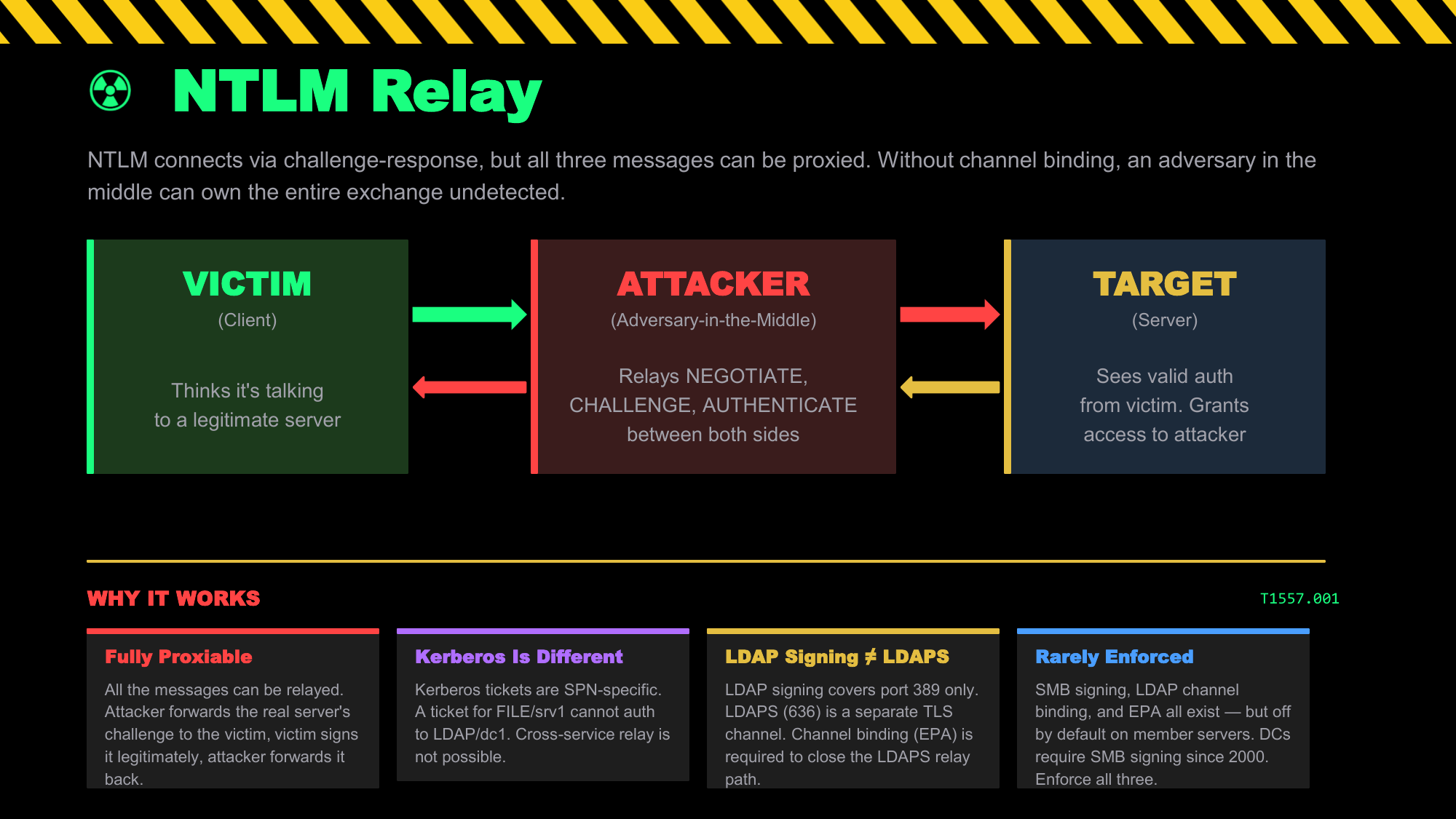
NTLM relay: the attacker proxies the entire authentication exchange in real time. All three messages can be relayed because NTLM has no concept of intended destination.
Kerberos: The Clearance System
Named after the three-headed dog guarding the gates of Hades, Kerberos is a ticket-based authentication protocol developed at MIT in the 1980s. The current version 5 specification is defined in RFC 4120 (2005), which superseded the original RFC 1510 (1993). Its core goal: allow two parties to prove their identities to each other and establish a shared secret, without ever revealing their long-term keys. The Key Distribution Center (KDC) makes this possible by being the trusted third party that knows everyone's keys.
The Cryptographic Goal
Kerberos solves a fundamental problem: how can two parties authenticate each other without sending passwords over the network and without needing to share secrets directly?
Think of it like a high-security vault clearance system: get verified once at the entry checkpoint, receive a security badge, then use that badge to get keycards for specific restricted zones without ever showing your credentials again.
The Vault-Tec Security Clearance Model
Think of Kerberos like the security clearance system in a high-security fallout vault:
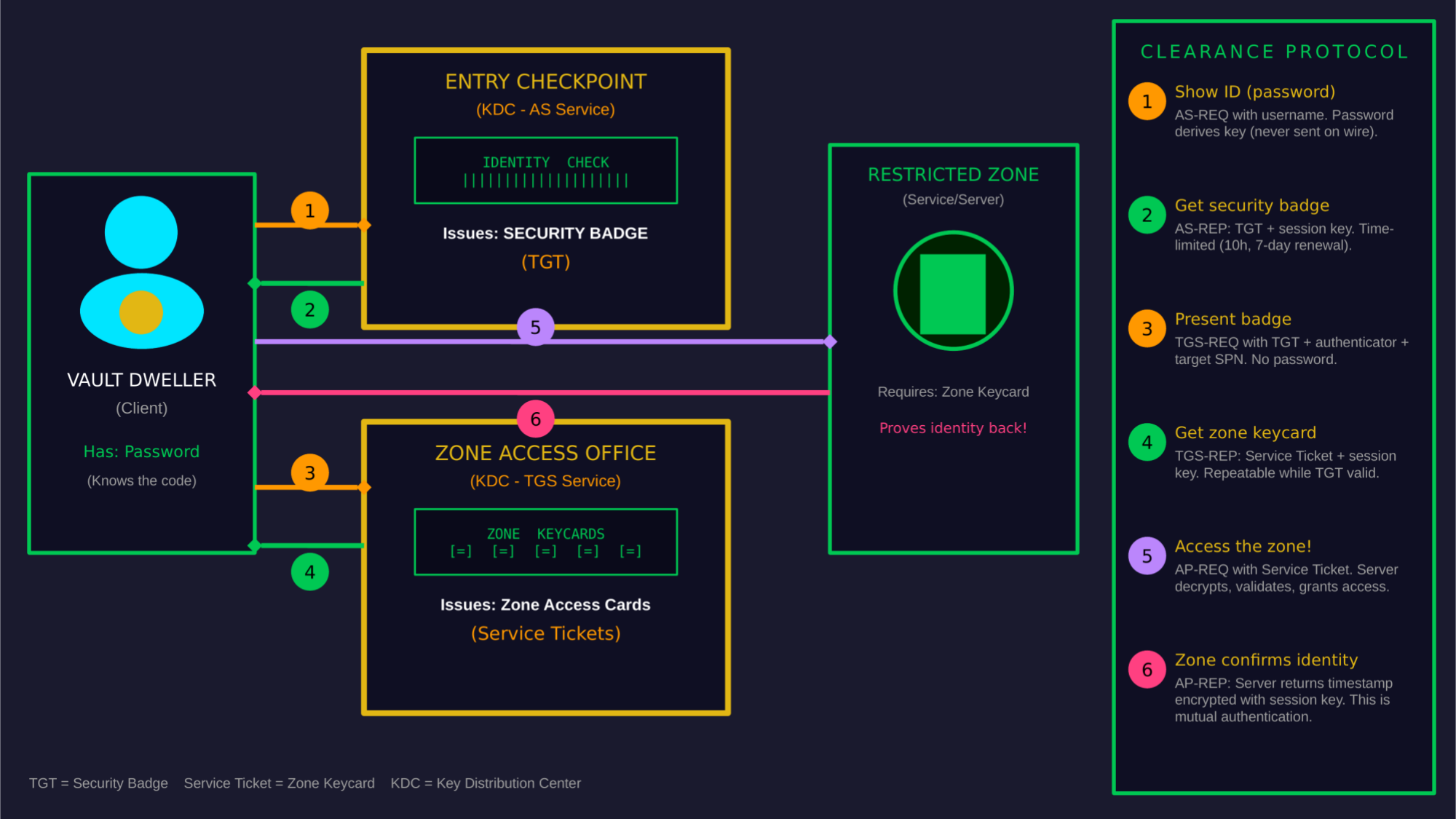
Kerberos as a vault security system: One security badge (TGT), unlimited zone keycards (service tickets)
The Entry Checkpoint (Authentication Service / AS): You arrive at the vault and show your credentials (password) to the security officer. They verify your identity against the master registry and issue you a security badge (TGT) that proves you're cleared to be in the facility.
The Zone Access Office (Ticket Granting Service / TGS): When you need to enter a restricted zone, you show your security badge (TGT) to the zone access office. They verify your badge and issue you a keycard (service ticket) for that specific zone. You never show your original credentials again.
The Restricted Zone (Service): You swipe your zone keycard at the door. The door's reader verifies the keycard is valid and grants access. It doesn't need to contact the entry checkpoint; the keycard itself is proof of authorization.
The Players
Kerberos involves three parties—hence the name, after the three-headed dog. In AD, the KDC runs on every Domain Controller.
Client (Principal)
The user or service that wants to authenticate. Has a secret key derived from their password (for users) or a randomly generated key (for machine accounts).
Key Distribution Center (KDC)
The trusted third party. In AD, this runs on Domain Controllers. Contains two services: the Authentication Service (AS) and the Ticket Granting Service (TGS). Knows everyone's keys.
Service (Server)
The resource the client wants to access. Has its own key (service account password hash or machine account key). Trusts tickets signed by the KDC.
The Kerberos Exchange: Technical Details
Now let's look at what's actually happening in each step (MS-KILE). Understanding these details is essential for understanding Kerberos attacks.
Step 1 & 2: AS Exchange (Getting the TGT)
• TGS session key (for talking to the ticket booth)
• Expiration time (default: 10 hours)
• PAC (Privilege Attribute Certificate) - your group memberships and SIDs
• All encrypted with the KRBTGT account's key
The TGT is encrypted with the KRBTGT account's password hash. Only the KDC can decrypt it. The client can't read or modify their own TGT; they just present it to get service tickets.
Step 3 & 4: TGS Exchange (Getting a Service Ticket)
• Service session key (for talking to the service)
• Expiration time
• PAC (copied from TGT, or regenerated)
• All encrypted with the service account's key
The service ticket is encrypted with the service account's password hash (or machine account key). Only that service can decrypt it. The KDC looks up the target service by its SPN (Service Principal Name).
Step 5: AP Exchange (Using the Service Ticket)
The service decrypts the ticket, validates it hasn't expired, checks the authenticator to prevent replay, and reads the PAC to determine the client's group memberships and privileges. Authorization decisions are based on this.
The PAC: Authorization Data
The Privilege Attribute Certificate (PAC) is a Microsoft extension to Kerberos. It contains the user's authorization information: SIDs, group memberships, and other data the service needs to make access decisions.
• Group SIDs (all groups the user belongs to)
• User account information (logon time, password last set, etc.)
• Server signature (signed with service key)
• KDC signature (signed with KRBTGT key)
The PAC is included in both the TGT and service tickets. When you forge a Golden Ticket, you write whatever group memberships you want into the PAC. The service reads the PAC and grants access based on those SIDs.
The PAC also carries a field that exists purely to stop name-confusion attacks:
PAC_REQUESTOR_SID. Added by the November 2021 patch for CVE-2021-42287
(the KDC half of noPac), it records the SID of the account that actually
requested the ticket, so the KDC can verify that the SID and the name in a ticket refer to the same
principal. It closed the noPac hole. It did not close every hole — see the change password protocol below.
The Change Password Protocol (kpasswd) — and ResetNightmare
Kerberos has a second, less-discussed service running alongside the KDC: the Kerberos Change Password protocol (RFC 3244), listening on port 464. It exists so a user can change their own password using a Kerberos ticket instead of an interactive logon. It is a separate code path from the AS and TGS exchanges — and that separation is exactly where ResetNightmare (CVE-2026-27912) lives.
Kerberos Change Password protocol: never included in that validation
Result: a ticket whose PAC SID and ticket name disagree is rejected by the KDC — but accepted by kpasswd
That gap turns a name-confusion trick into an arbitrary password reset. The attacker never needs to know the target's current password, and never needs privilege over the target account — only over an account they control:
userPrincipalName you can write(GenericWrite over your own object, or just create one — MachineAccountQuota defaults to 10)
2. Set that account's UPN to the target's
sAMAccountName (e.g. DemoAdmin1)→ AD's uniqueness check passes: a bare SAM name collides with no existing UPN
3. Request a TGT with name type
NT-ENTERPRISE, the target's name, and your password→ DC returns a ticket with YOUR SID in the PAC but the TARGET's name in the ticket
4. Present that ticket to kpasswd (port 464) and change the password
→ No PAC_REQUESTOR_SID check. The change lands on the TARGET account.
5. Clear the spoofed UPN, request a TGT as the target with the new password → domain takeover
sAMAccountName have no legitimate use. Disclosed by Shai Laron of
Semperis;
PoC is public
as of August 2026. See Defense & Detection for hunting queries.
Pre-Authentication: The First Line of Defense
By default, Kerberos requires "pre-authentication" in the AS-REQ. The client must prove they know the password by encrypting a timestamp with their key before the KDC issues a TGT.
KDC verifies the timestamp decrypts correctly → user knows the password → issues TGT
KDC issues: AS-REP with part encrypted using user's key
Attacker extracts encrypted blob and cracks it offline
Clock Skew: Kerberos's Achilles' Heel
Kerberos is time-sensitive. Timestamps are embedded in authenticators and tickets to prevent replay attacks. If the clocks between client, KDC, and service drift too far apart, Kerberos fails.
In AD environments, the PDC Emulator is the authoritative time source. Domain members sync to it automatically. But VMs, disconnected laptops, or misconfigured NTP can cause drift.
w32tm /query /status to verify. Clock skew is one of the most common causes of
mysterious authentication failures in AD environments.
Delegation: When Services Need to Act as You
Sometimes a service needs to access other services on your behalf. For example, a web server needs to query a database as you, not as the web server's service account. This is delegation.
Unconstrained Delegation DANGEROUS
The service receives and caches your TGT. It can impersonate you to ANY service. Domain Controllers have this by default. Compromise a server with unconstrained delegation, extract cached TGTs, impersonate anyone who connects.
Constrained Delegation RISKY
Service can only delegate to specific SPNs listed in msDS-AllowedToDelegateTo. Safer, but if you control a service with constrained delegation, you can impersonate any user to those target services (S4U2Proxy).
Resource-Based Constrained Delegation ABUSABLE
The target service controls who can delegate to it (msDS-AllowedToActOnBehalfOfOtherIdentity). If you can write to this attribute, you can configure the target to accept delegation from an account you control. RBCD abuse is a common privilege escalation path.
Protected Users: The Admin Bunker
The Protected Users security group, introduced in Server 2012 R2, fundamentally changes how authentication works for its members. It's the closest thing Windows has to a "make this account actually secure" button. But it comes with trade-offs.
No DES/RC4: Only AES encryption for Kerberos. Weak ciphers blocked.
No Delegation: Account cannot be delegated. No unconstrained, constrained, or RBCD.
No Credential Caching: Plaintext credentials and NT hashes not cached in LSASS.
Short TGT Lifetime: 4-hour TGT lifetime (not the default 10 hours). Non-renewable.
At the protocol level: When a Protected Users member authenticates, the KDC enforces these restrictions regardless of other policy settings. The TGT is issued with a 4-hour lifetime and the non-forwardable, non-delegatable flags set. The account's credentials are handled differently by LSASS.
What It Prevents
Pass-the-Hash: No NT hash cached = nothing to pass.
NTLM Relay: No NTLM = nothing to relay.
Kerberos Delegation Abuse: Non-delegatable tickets can't be abused.
Credential Theft Window: 4-hour TGT limits exposure time.
What It Breaks
NTLM-only Apps: Any application requiring NTLM will fail.
Delegation Scenarios: Multi-hop scenarios (web→SQL) won't work.
RDP with Saved Creds: Credential Manager won't have cached creds.
Offline Access: No cached credentials for laptop offline logon.
Kerberos Attack Summary
AS-REP Roasting
Target accounts without pre-auth. Request AS-REP, crack the encrypted portion offline to recover passwords. MITRE T1558.004
Kerberoasting
Request service tickets for SPNs (Tim Medin, 2014), extract with Rubeus or Impacket and crack offline. Target user-based service accounts with weak passwords. MITRE T1558.003
Golden Ticket
Forge TGTs with KRBTGT hash. Become any user with any groups. Persists until KRBTGT rotated twice. MITRE T1558.001
Silver Ticket
Forge service tickets with service account hash. Access that service as any user. Never touches KDC. MITRE T1558.002
Pass-the-Ticket
Steal existing tickets (TGT or service tickets) from memory using Mimikatz or Rubeus. Use them on another machine to impersonate that user. MITRE T1550.003
Delegation Abuse
Exploit unconstrained, constrained, or RBCD to impersonate users to services you shouldn't access.
ResetNightmare
Spoof a UPN, request an NT-ENTERPRISE TGT, then abuse the change password protocol (port 464) — which skips PAC_REQUESTOR_SID validation — to reset any account's password. CVE-2026-27912
NTLM vs Kerberos: When Each Is Used
Windows doesn't always use Kerberos. Sometimes it falls back to NTLM. Understanding when each protocol is used explains why NTLM won't die and why certain attacks work in certain situations.
The Decision Tree
Windows tries Kerberos first, but falls back to NTLM in several situations:
| Scenario | Protocol Used | Why |
|---|---|---|
| Access by hostname (\\server\share) | Kerberos | Can look up SPN for the hostname |
| Access by IP address (\\192.168.1.10\share) | NTLM | No hostname means no SPN lookup possible |
| Target not domain-joined | NTLM | No Kerberos realm, no KDC to issue tickets |
| Client not domain-joined | NTLM | Client can't get tickets from a KDC |
| Local account authentication | NTLM | Local accounts aren't in AD, no Kerberos principals |
| Cross-forest with NTLM trust | NTLM | Some external trusts only support NTLM |
| Application explicitly requests NTLM | NTLM | Legacy apps may hardcode NTLM |
| Kerberos fails (clock skew, DC unreachable) | NTLM | NTLM is the fallback when Kerberos can't work |
Protocol Comparison
| Feature | NTLM | Kerberos |
|---|---|---|
| Authentication Type | Challenge-response | Ticket-based |
| Trusted Third Party | None (or DC for pass-through) | KDC (Domain Controller) |
| Mutual Authentication | No (by default) | Yes (optional but supported) |
| Delegation Support | Limited | Full (unconstrained, constrained, RBCD) |
| Offline Cracking | Yes (capture response, crack) | Yes (Kerberoasting, AS-REP roasting) |
| Relay Attacks | Yes (major vulnerability) | Yes — historically limited to local relay (KrbRelay), but CVE-2026-20929 enables cross-service relay via DNS CNAME abuse |
| Pass-the-Hash | Yes | N/A (Pass-the-Ticket instead) |
| Requires DC Contact | For domain auth, yes | Only for ticket requests |
| Clock Sensitivity | None | Yes (5-minute tolerance by default) |
SMB File Access: NTLM vs Kerberos Attack Surface
The protocol choice doesn't just change the handshake — it changes the entire attack surface at every layer of the stack. These diagrams break down SMB file access through each protocol path, showing where attacks are possible at each layer.
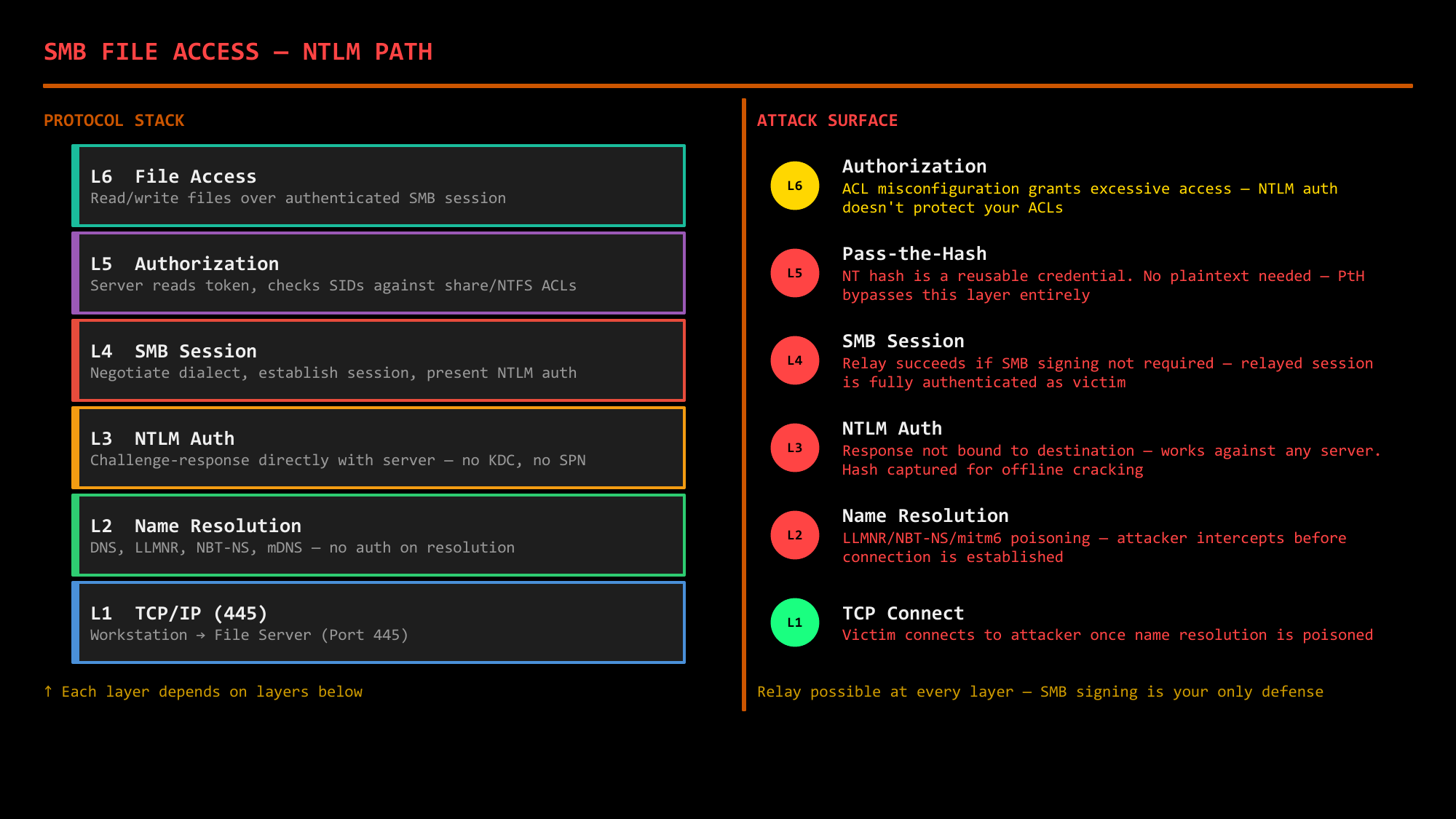
NTLM path: relay possible at every layer — SMB signing is your only defense
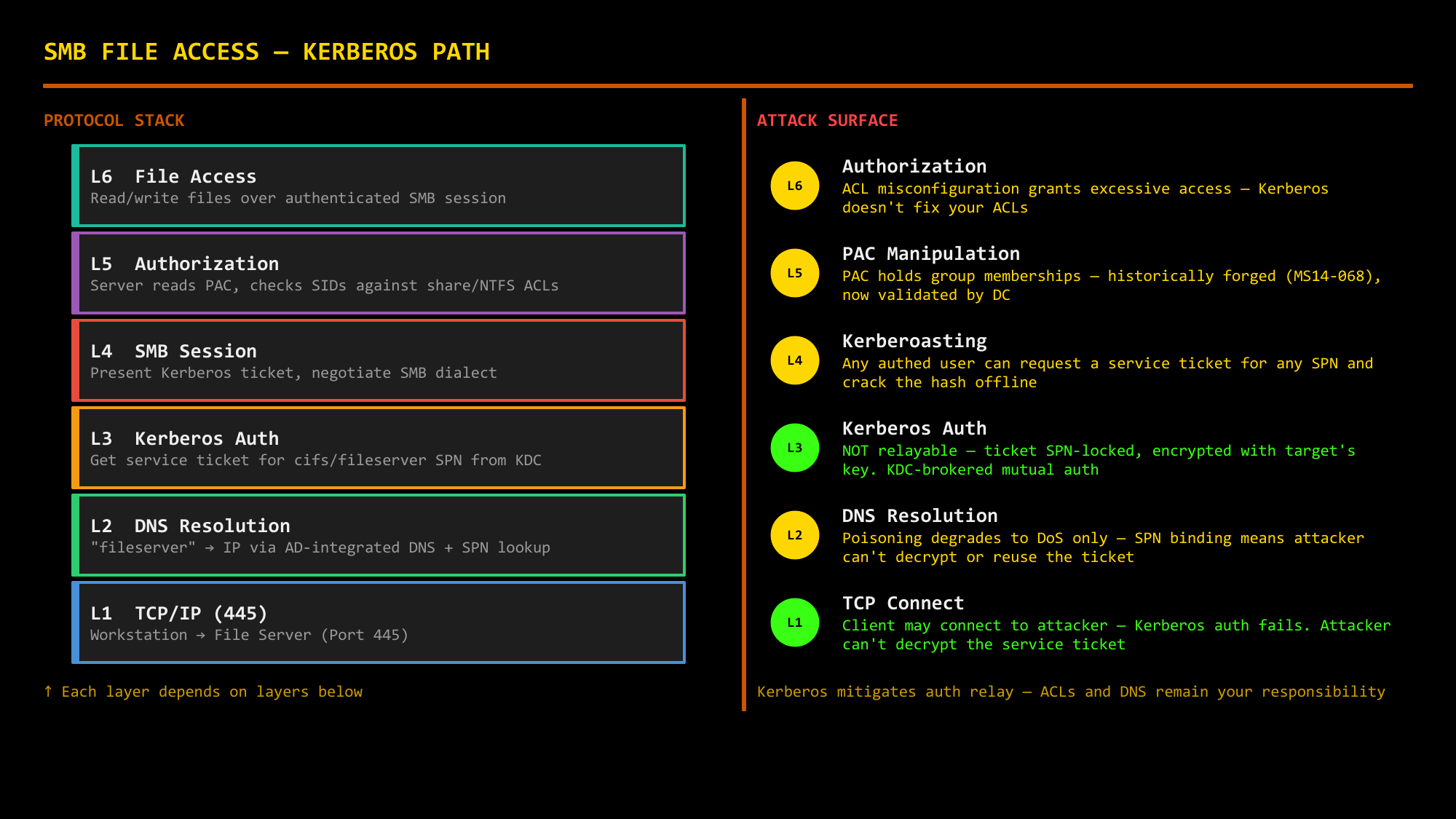
Kerberos path: SPN-locked tickets mitigate relay, but DNS and ACLs remain your responsibility
NTLM Fallback: When Kerberos Fails, Everything Changes
Kerberos requires specific conditions to work: a resolvable hostname, a valid SPN, line of sight to a DC, and synchronized clocks. When any of these conditions aren't met, Windows silently falls back to NTLM — changing the entire attack surface without the user noticing.
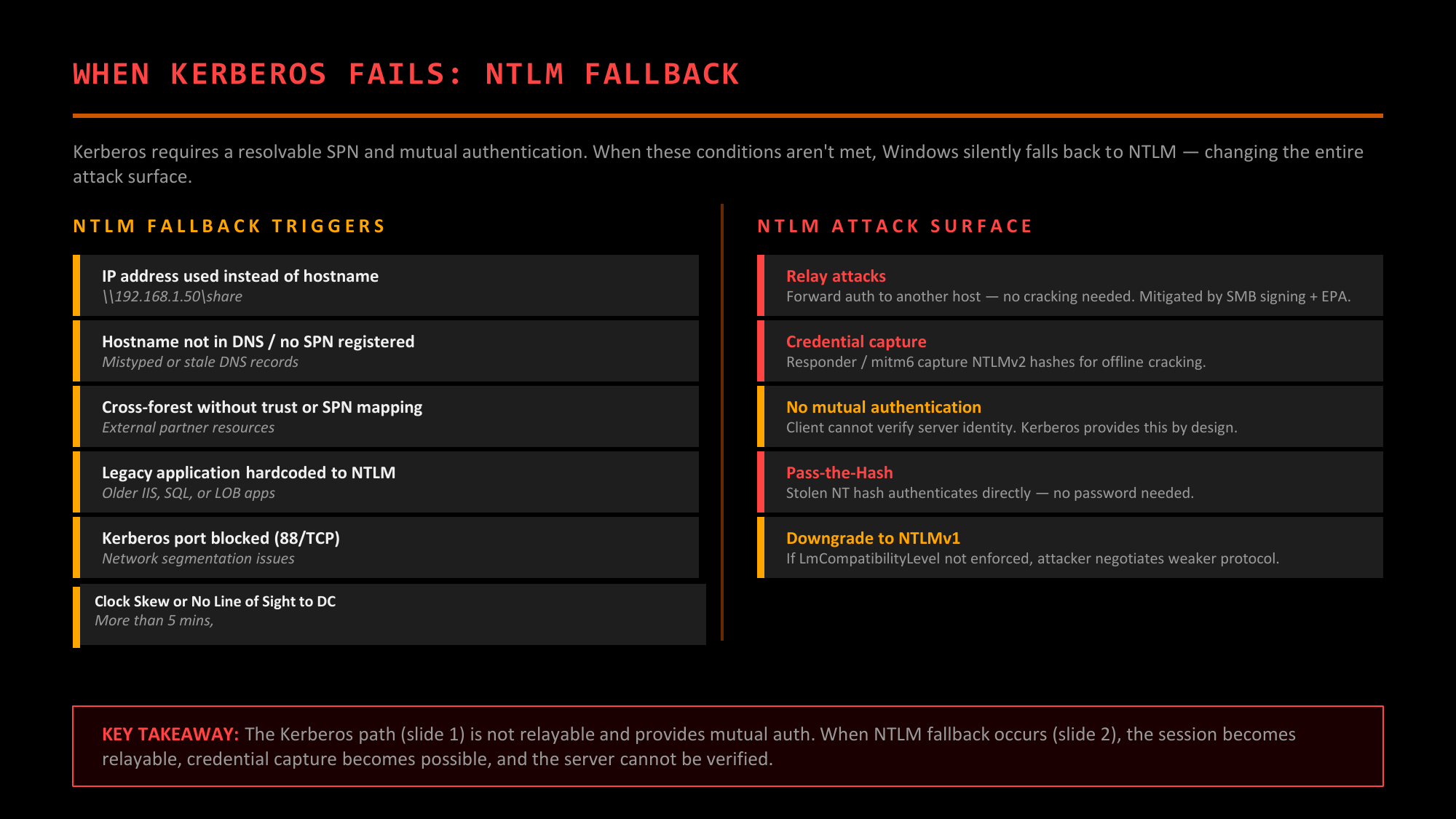
When Kerberos fails, Windows silently falls back to NTLM — and the attack surface expands dramatically
IP Address Instead of Hostname
\\192.168.1.50\share — No hostname means no SPN lookup, so Kerberos can't request a ticket.
Extremely common in scripts, admin workflows, and automation. Windows 10+ can be configured to
use Kerberos with IP addresses, but this is not the default.
Hostname Not in DNS / No SPN
Mistyped or stale DNS records. If the hostname can't be resolved to an SPN, Kerberos has no target to request a ticket for.
Cross-Forest Without Trust or SPN Mapping
External partner resources or forests with NTLM-only trusts. Kerberos requires a trust path and SPN resolution across the forest boundary.
Legacy Application Hardcoded to NTLM
Older IIS, SQL, or line-of-business applications that explicitly request NTLM authentication regardless of what the environment supports.
Kerberos Port Blocked (88/TCP)
Network segmentation issues that prevent the client from reaching a DC on port 88. Kerberos fails and NTLM takes over — but only if the DC is still reachable on other ports (445, 389, etc.) for NTLM pass-through validation. If the DC is completely unreachable, authentication fails entirely.
Clock Skew or No Line of Sight to DC
More than 5 minutes of clock drift (the default Maximum Tolerance), or no connectivity to any Domain Controller. VMs, disconnected laptops, and misconfigured NTP are common culprits.
Why NTLM Won't Die
Microsoft has been working to deprecate NTLM for years, formally announcing it as a deprecated feature in Windows 11 Insider builds in 2023. It's still everywhere. Why?
Backward Compatibility
Legacy applications, old devices, and non-Windows systems often only support NTLM. Breaking them is unacceptable for many organizations.
IP-Based Access
Any time you access something by IP address instead of hostname, NTLM is used. This is extremely common in scripts, automation, and admin workflows.
Local Accounts
Local administrator accounts (not domain accounts) use NTLM. LAPS-managed local admin passwords still authenticate via NTLM.
Fallback Behavior
NTLM is the safety net when Kerberos fails. Disabling it can cause authentication failures that are hard to troubleshoot.
LDAP Authentication
LDAP is the protocol for querying and modifying Active Directory. But it also supports authentication through a process called "binding." How you bind determines your security posture.
LDAP Bind Types
Simple Bind INSECURE
Username and password sent in cleartext. Only acceptable over LDAPS (LDAP over TLS on port 636) or with StartTLS. Over plain LDAP (port 389), credentials are visible to anyone sniffing the network.
SASL Bind SECURE
Uses SASL (Simple Authentication and Security Layer) mechanisms. In AD, this typically means GSSAPI (Kerberos) or NTLM. Credentials are not sent in cleartext; the underlying protocol handles authentication securely.
Anonymous Bind LIMITED
Connect without credentials. AD allows very limited anonymous access by default (rootDSE only). Older configurations or misconfigurations may allow more. Rarely useful for attackers in modern AD.
LDAP Signing and Channel Binding
Even with SASL bind, LDAP traffic can be intercepted or relayed without additional protections.
Certificate Authentication (PKINIT)
PKINIT (Public Key Cryptography for Initial Authentication) is the third major authentication mechanism in Active Directory alongside NTLM and password-based Kerberos. It lets you use X.509 certificates instead of passwords for Kerberos authentication — proving you possess a private key rather than knowing a password. This is the foundation of smart card authentication, WiFi 802.1X, VPN certificate auth, and the majority of ADCS attack paths.
Why PKINIT Matters as a Standalone Protocol
PKINIT isn't just "Kerberos with certificates" — it fundamentally changes the security model. Understanding it as its own authentication path is critical because it ties directly into ADCS, and ADCS misconfigurations are among the most common routes to domain compromise.
Smart Card Authentication
The original use case. Physical smart cards contain a private key and certificate. The client signs the AS-REQ with the smart card's private key instead of encrypting with a password-derived key.
X.509 Certificates
Any certificate with a Client Authentication EKU and proper UPN mapping can be used for PKINIT. This is why ADCS is so dangerous — it's a certificate factory that ties directly into Kerberos authentication.
Ties Into ADCS
ADCS issues the certificates that PKINIT consumes. Misconfigured certificate templates (ESC1-ESC16) allow attackers to obtain certificates that authenticate as any user — including Domain Admins.
Shadow Credentials Abuse
Writing to msDS-KeyCredentialLink lets attackers add their own certificate-based
credential to any account they have GenericWrite over, then authenticate as that account via PKINIT
without knowing or changing the password.
How PKINIT Works
In normal Kerberos, the client proves identity by encrypting a timestamp with their password-derived key. With PKINIT, the client signs the AS-REQ with their private key instead.
PKINIT AS Exchange
The KDC maps the certificate to an AD account using either the UPN (User Principal Name) in the certificate's SAN (Subject Alternative Name) or explicit certificate mapping attributes. Once mapped, the client receives a TGT just like password-based authentication.
Why Certificates Are Dangerous
Certificates seem more secure than passwords, but they introduce new attack surfaces:
Certificates Are Credentials
A certificate with private key is equivalent to knowing the user's password. If you obtain a certificate for a user, you can request TGTs as that user until the certificate expires or is revoked.
Long Validity Periods
Certificates often valid for 1+ years. Password changes don't invalidate existing certificates. An attacker with a certificate has persistent access even if the password is rotated.
ADCS Misconfigurations
Certificate templates that allow low-privileged users to request certificates for any user, or that include weak name mappings, can be exploited to gain certificates for privileged accounts. See Certified Pre-Owned research.
Shadow Credentials
Attackers can write to msDS-KeyCredentialLink on accounts they control, adding their own
"shadow" credentials. They can then authenticate as that account using PKINIT without
knowing or changing the password. See Elad Shamir's original research and the Whisker tool.
Modern Protocols: Federation & Beyond
As organizations moved to the cloud and needed to authenticate across organizational boundaries, new protocols emerged. These don't replace NTLM or Kerberos for on-premises AD; they extend authentication to web applications, SaaS services, and hybrid environments.
SAML (Security Assertion Markup Language)
SAML is an XML-based protocol for exchanging authentication and authorization data between parties. It enables Single Sign-On (SSO) across organizational boundaries.
Service Provider (SP): Relying party that trusts the IdP's assertions (e.g., Salesforce, AWS)
Principal: The user being authenticated
OAuth 2.0 & OpenID Connect (OIDC)
OAuth 2.0 is an authorization framework (not authentication). OIDC adds an authentication layer on top. Together, they power "Login with Google/Microsoft/etc." buttons everywhere.
How Modern Protocols Connect to AD
These protocols don't operate in isolation. In hybrid environments, they often sit on top of traditional AD authentication:
The chain is only as strong as its weakest link. Compromise on-prem AD, and you potentially compromise all federated cloud services. This is why hybrid identity is both powerful and dangerous.
The Protocol Stack: Layers of Risk
Authentication doesn't happen in isolation. When you access a file share, multiple protocols work together. Understanding this stack reveals why hardening one layer while ignoring others creates a false sense of security.
Anatomy of a File Share Access
Let's trace what happens when a user accesses \\fileserver\share from a domain-joined workstation:
Each layer depends on the layers below. Compromise any layer, disrupt everything above.
The Full Sequence
The Fallacy of Single-Layer Hardening
Organizations often harden one protocol while ignoring others. This creates dangerous gaps:
Hardened Kerberos, Weak DNS
You've enforced AES encryption and disabled RC4. But DNS is unsigned and unauthenticated. Attacker poisons DNS to redirect "fileserver" to their machine. Client requests a Kerberos ticket for the real fileserver, connects to the attacker, and the attacker relays to the real server. Your Kerberos hardening didn't help.
SMB Signing Enabled, LDAP Unsigned
SMB relay is blocked by signing. But LDAP signing isn't required. Attacker coerces authentication (PetitPotam, PrinterBug/SpoolSample) and relays to LDAP. They modify AD objects: set RBCD, add shadow credentials, change group memberships. SMB hardening didn't protect AD.
NTLM Disabled, But Fallback Exists
You've "disabled NTLM" via GPO. But one legacy application has an exception. Attacker targets that system, captures NTLM, relays or cracks. One exception undermines the entire policy.
Strong Auth, Weak Authorization
Perfect authentication doesn't help if ACLs are misconfigured. User authenticates securely, but has WriteDACL on a privileged group because of inherited permissions from 15 years ago. Authentication worked exactly as designed; authorization was the problem.
What If DNS Is Compromised?
DNS is the foundation. If an attacker controls name resolution, they control where your traffic goes:
2. "fileserver" now resolves to attacker's IP
3. Client connects to attacker, thinking it's the file server
4. If using NTLM: Attacker relays authentication to real server or cracks it
5. If using Kerberos: Client has a ticket for the real server, presents it to attacker who relays it
Kerberos mutual authentication is supposed to prevent this. The client should verify the server knows the service's key. But in practice, applications often don't verify AP-REP, and ticket relay attacks exist. Worse, CVE-2026-20929 demonstrated that DNS CNAME poisoning can cause the Kerberos client to request a ticket for an attacker-chosen SPN entirely, enabling cross-service Kerberos relay without needing to break mutual authentication at all. DNSSEC and secure DNS are critical but rarely deployed in enterprise environments.
Securing Authentication: The Containment Protocol
Hardening authentication requires a comprehensive approach across all protocols. Like containing radioactive material, every layer needs proper shielding. Here's the defense-in-depth approach.
NTLM Hardening
Disable NTLM Where Possible
Use "Network security: Restrict NTLM" policies to audit and then block NTLM. Start with audit mode to identify dependencies, then progressively restrict. Goal: NTLM only where absolutely required.
Require NTLMv2
Set LAN Manager Authentication Level to "Send NTLMv2 response only. Refuse LM & NTLM." This prevents downgrade to crackable NTLMv1 responses.
Enable EPA
Extended Protection for Authentication binds NTLM auth to the TLS channel. Prevents relay attacks by ensuring authentication can only be used on the channel where it was performed.
Disable LM Hash Storage
"Network security: Do not store LAN Manager hash value on next password change" should be enabled (it is by default on modern systems). Verify it's not overridden.
Kerberos Hardening
Disable RC4 Encryption
RC4 (arcfour-hmac) is weak. Configure "Network security: Configure encryption types allowed for Kerberos" to require AES only. Note: This can break older systems that don't support AES.
Enable Kerberos Armoring (FAST)
Flexible Authentication Secure Tunneling protects pre-authentication exchanges. Prevents AS-REP roasting and provides additional protection for the initial exchange.
Use Protected Users Group
Members cannot use NTLM, delegation, or DES/RC4. TGTs have 4-hour lifetime. Add privileged accounts. Prevents many credential theft and lateral movement techniques.
Rotate KRBTGT Regularly
KRBTGT password should be rotated at least annually and immediately after any suspected compromise. Requires two rotations to fully invalidate old Golden Tickets.
LDAP Hardening
Require LDAP Signing
"Domain controller: LDAP server signing requirements" = Require signing. Prevents LDAP relay attacks and message tampering. Finally default in Server 2025.
Require Channel Binding
"Domain controller: LDAP server channel binding token requirements" = Always. Binds authentication to the TLS session, preventing relay over different channels.
Enforce LDAPS
Where possible, require LDAPS (port 636) instead of LDAP (port 389). Encrypts traffic and provides channel for binding. Requires proper certificate deployment.
Disable Anonymous Binds
Should be default, but verify. Anonymous binds allow unauthenticated LDAP queries. Even limited information leakage helps attackers enumerate the environment.
SMB Hardening
Require SMB Signing
"Microsoft network server: Digitally sign communications (always)" = Enabled. Prevents SMB relay attacks. Has minor performance impact but critical for security.
Disable SMBv1
SMBv1 is deprecated and dangerous (EternalBlue, WannaCry). Should be disabled everywhere. Use "Get-SmbServerConfiguration" to verify and "Disable-WindowsOptionalFeature" to remove.
Enable SMB Encryption
SMB 3.0+ supports encryption. "Set-SmbServerConfiguration -EncryptData $true" encrypts all SMB traffic. Provides confidentiality beyond just signing.
Require Secure Negotiate
Prevents downgrade attacks during SMB negotiation. "Set-SmbServerConfiguration -RequireSecuritySignature $true" on servers.
Certificate/PKINIT Hardening
Audit Certificate Templates
Review all templates for ESC1-ESC8+ vulnerabilities. Tools like Certify and Certipy can identify misconfigurations. Remove unnecessary enrollment permissions.
Require Manager Approval
For high-privilege certificate templates, require CA manager approval. Prevents automated abuse of misconfigured templates.
Enable Strong Mapping
Use explicit certificate mapping instead of implicit UPN mapping. Prevents certificate spoofing attacks where attackers create certs with arbitrary UPNs.
Monitor Certificate Issuance
Log and alert on certificate requests, especially for privileged templates. Unexpected certificate issuance may indicate compromise.
The Complete Picture
| Protocol/Layer | Primary Threat | Key Mitigation | Server 2025 Default |
|---|---|---|---|
| NTLM | Relay, Pass-the-Hash, Cracking | Disable or restrict NTLM; EPA | Still allowed (for compatibility) |
| Kerberos | Kerberoasting, Golden/Silver Tickets | AES only, Protected Users, FAST | RC4 still allowed |
| LDAP | Relay, Credential theft | Signing + Channel Binding | Signing required |
| SMB | Relay, EternalBlue | Signing, disable SMBv1 | DCs require signing (inbound + outbound); member servers require signing as client — inbound unsigned still allowed |
| ADCS/PKINIT | ESC1-ESC8+, Shadow Credentials | Template audit, strong mapping | No significant changes |
| DNS | Poisoning, spoofing | DNSSEC (rarely deployed) | Unsigned by default |